
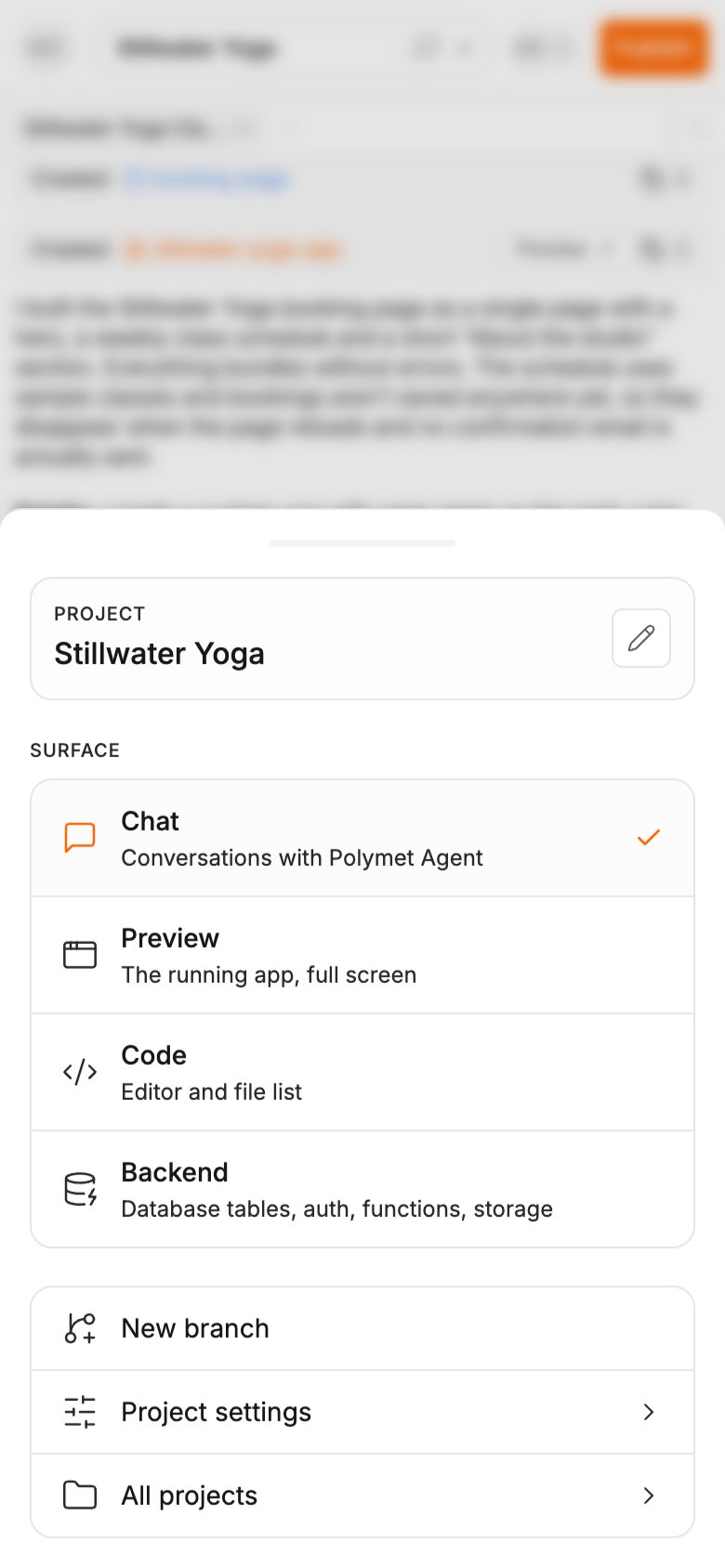
Move between views
The top bar has your account menu on the left, the project pill in the middle, and share and Publish on the right.- Tap the project pill. It shows the project name and the icon of the view you are on.
- Under Surface, tap the view you want:
The same sheet has a pencil to rename the project, Project settings and All projects. While the project has only one branch, it also has New branch.
Know when a result is ready
You can’t see the preview while you are in Chat, so the project pill tells you:- A spinner in the pill means the agent is still building.
- When it finishes, the pill turns highlighted with a dot, and Preview in the sheet is tagged updated.
Preview
Preview opens over the page, so it has its own way back: tap Chat at the top left.- Tap the file name to pick another page, component or prototype.
- Refresh reloads the screen.
- Open in new tab opens your working copy in its own browser tab.
Code and Backend
Code shows the file list first. Tap a file to open it in the editor, and use the back button to return to the list. Saving works as it does on a desktop. See Edit code. Backend shows your project’s database, sign-in, functions and storage. See Manage your data.What stays on desktop
These need a mouse and a wide screen, so a phone leaves them out:- The canvas board, with its nodes and auto-organize
- Select for picking elements to change (Select and edit with AI)
- Edit for the visual editor (Edit visually)
- Zoom, breakpoints and Take screenshot in the preview toolbar
- Export to Figma
Related
- Prompt the agent — everything in the generation input, which works the same on a phone
- The canvas — the desktop board
- Publish a prototype — the Publish button in the top bar
- Manage your data — the Backend view