
Threads
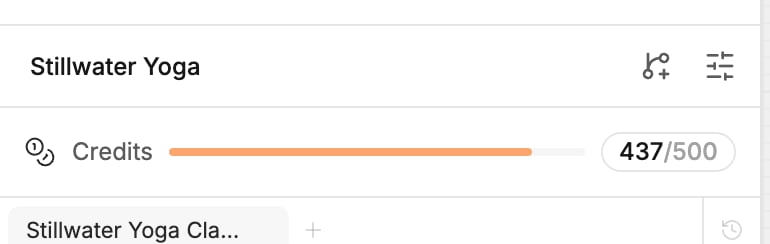
The tabs above the chat are your threads.- Start one: click the plus (New thread), or type
/clearin the generation input. The thread you left stays as it was. - Switch: click a tab. You can switch while the agent works; the generation keeps running in its own thread.
- Rename: open the tab’s menu and click Rename.
- Delete: open the tab’s menu and click Delete. Polymet asks Delete thread? This deletes the thread and its messages for good.
How much the agent remembers
The ring next to the model name is the context meter. It fills as the conversation grows, and changes color as it nears the point where the agent summarizes. Hover it to see the numbers. Click it to open Context: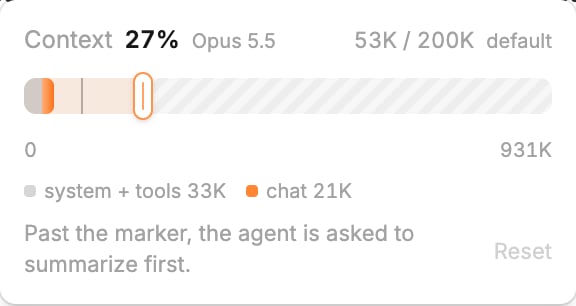
- The percentage and the numbers show how much of the conversation the agent is holding, against the point where it summarizes.
- The bar shows the same thing across the model’s full limit. Part of it is always taken by Polymet’s own instructions (system + tools); the rest is your chat.
- The marker on the bar is the auto-compact point. Past the marker, the agent is asked to summarize first.
Auto-compact
When a thread reaches the marker, the agent summarizes the conversation and carries on from the summary. The chat shows Compacting…, then Compacted. You don’t need to do anything. To change when this happens, drag the marker on the Context bar. A later point lets the agent hold more of the conversation; an earlier one keeps generations smaller. The marker can’t go below 100,000 tokens. Click Reset to go back to the model’s default; default next to the numbers means you haven’t changed it. The setting is yours, saved for each model. To summarize right away, type/compact. Compacting uses credits like any other generation.
Slash commands
Type/ at the start of the generation input to open the command list. Use the arrow keys and press Enter or Tab to pick one, or Esc to close it.
Slash commands are on the canvas only, and not while a generation is running.
Queue a message while the agent works
You don’t have to wait for a generation to finish. Keep typing, then pick when your message goes:
You can also click the queue button, just left of the stop button, and pick from its menu. On Windows, use Ctrl instead of Cmd.
Queued messages wait above the generation input, with how many are queued and Clear to drop them all. For each one you can:
- click its slot label to move it to the other slot
- edit it with the pencil
- send it now with its send button, once nothing is running
- remove it with the cross
Related
- Prompt the agent — everything else in the generation input
- Models and thinking effort — the model a new thread starts with
- Branches — parallel work, and why a thread can wait for another
- How credits work — what a generation and a compaction cost