
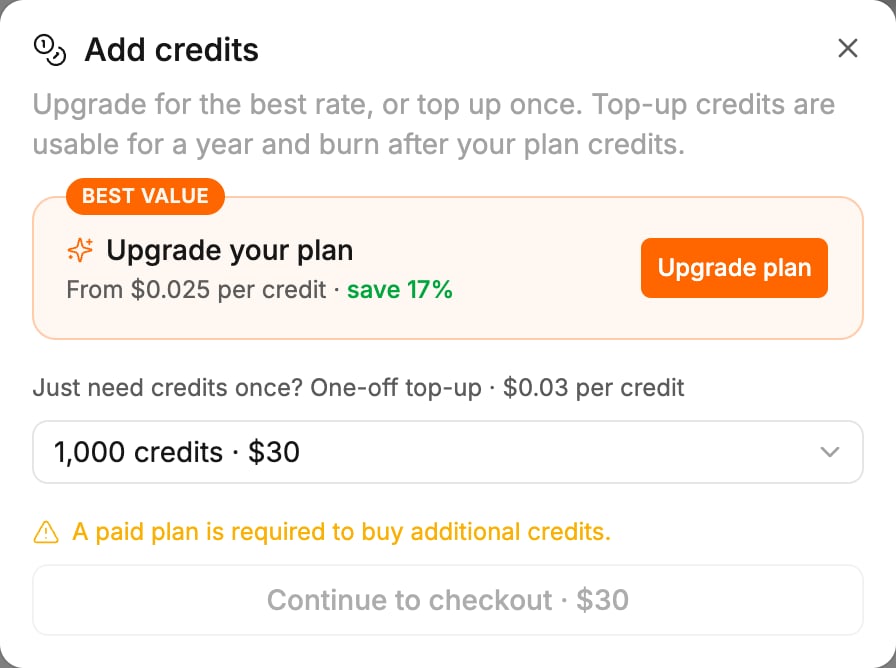
Buy a credit pack
- Open the Add credits dialog. Any of these opens it:
- Settings > Plans & Credits > Add credits
- Buy Credits in the profile menu
- Buy credits next to a low or empty balance on the canvas, or on the out-of-credits message in chat
- Pick an amount from the menu. Each row shows the credits and the price.
- Click Continue to checkout. The button shows the price, for example Continue to checkout · $30.
- Pay on the checkout page.
Prices
Packs cost 3 cents a credit on Pro and Keep Alive, and 6 cents a credit on Team.
For comparison, the Pro plan costs 2.5 cents a credit at its two smallest sizes and 2 cents a credit from 5,000 monthly credits up. See Plans.
How long they last
- Credits from a pack stay spendable for 365 days from purchase.
- They are spent after free credits, alongside your plan credits, the ones that expire soonest first. Since plan credits usually expire sooner, pack credits are normally used last. See How credits work.
- They stay yours if you cancel or move to a smaller plan.
- A purchase is added straight away, even if a plan change is scheduled.
When you cannot buy
Related
- How credits work — free credits, spend order, rollover
- Invoices and failed payments — where the receipt for a pack lives
- When you run low or run out — the messages that lead here